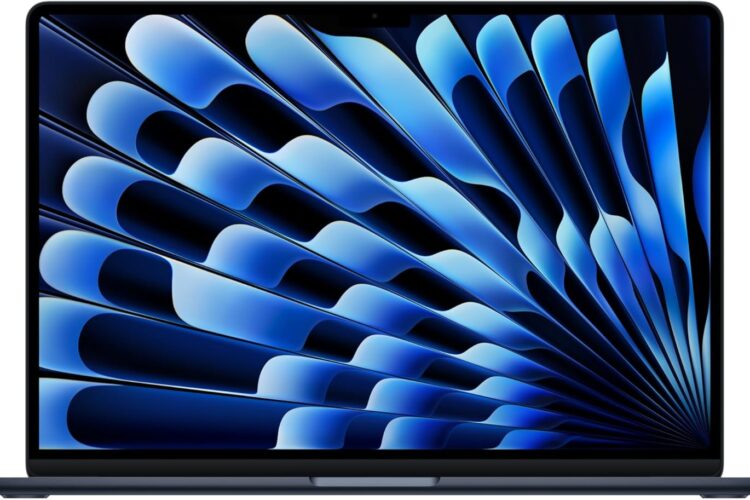
There is something to be said for a laptop that does not try to be everything. The MacBook Air 13-inch has always occupied a specific and well-defined space — a compact, lightweight machine that handles a broad range of tasks without the bulk or price tag of a professional workstation. With the 2026 update and the arrival of the M5 chip, Apple has pushed this formula further, adding AI-focused processing, a refined camera system, and next-generation wireless connectivity, all while keeping the design familiar and the footprint small.
This article walks through what the 2026 MacBook Air 13-inch actually offers, how it fits into different workflows, and what to think about before making a decision. The goal here is straightforward information — not hype, not sales language, just a clear picture of what this machine is and who it works well for.
What the MacBook Air 13-inch Is Designed to Be
Understanding any laptop starts with understanding its design philosophy. The MacBook Air line has always been built around efficiency and portability rather than maximum performance. It has no fan, no vents, and no active cooling of any kind. The entire thermal management strategy relies on the chip being efficient enough that it rarely needs to dump significant heat.
This approach has worked increasingly well as Apple’s chips have matured. The M5 continues that trajectory, delivering more processing capability per watt than its predecessors while staying within the thermal boundaries of a fanless design.
The 13-inch form factor is the more compact of the two MacBook Air sizes Apple currently offers. At 13.6 inches diagonally, the display is large enough for comfortable daily use while keeping the overall footprint small enough to slide into most bags without a second thought. For users who move frequently — between classes, offices, coffee shops, or cities — the size difference between a 13-inch and a 15-inch laptop matters more than it might seem on paper.
Key Features of the 2026 MacBook Air 13-inch M5
The M5 Chip and What AI-Ready Actually Means
Apple’s description of the M5 as “built for AI” reflects a real architectural shift rather than a marketing angle. The chip includes a Neural Engine — dedicated silicon specifically designed to handle machine learning computations. This is separate from the main CPU and GPU cores, which means AI processing tasks run without competing for resources with everything else the machine is doing.
In practical terms, this shows up in a growing number of applications. Real-time transcription tools, AI-assisted writing features, photo enhancement algorithms, voice recognition, and on-device language processing all benefit from having dedicated neural hardware. The key advantage over cloud-based AI processing is twofold: speed and privacy. Tasks happen locally, which means results come faster and your data does not leave the device.
Beyond the Neural Engine, the M5’s CPU and GPU cores handle general computing tasks with a level of efficiency that is difficult to match in the same form factor. The chip architecture is designed to deliver performance when needed and drop to low-power states quickly when it is not — which is a significant reason why battery life on Apple Silicon machines tends to be strong.
13.6-inch Liquid Retina Display
The display on the MacBook Air 13-inch is sharp, accurate, and bright enough to use comfortably in most lighting environments. The Liquid Retina panel produces clean text and detailed imagery, which matters whether you are reading long documents, editing photos, or simply browsing the web for extended periods.
True Tone technology adjusts the display’s white balance based on the ambient light in the room. In warm indoor lighting, the screen shifts slightly warmer. In cooler, daylight environments, it shifts accordingly. The result is a screen that feels natural to look at without requiring manual adjustment, which reduces visual fatigue over long sessions.
The 13.6-inch size means you are working with a somewhat limited canvas compared to larger laptops. For users who regularly work across many windows simultaneously, this can feel constrictive. For those who tend to focus on one or two applications at a time, it is perfectly comfortable. External monitor support via the Thunderbolt ports is a straightforward way to expand the workspace when needed.
16GB Unified Memory
Unified Memory in Apple Silicon works differently from traditional RAM. Rather than having separate memory pools for the CPU and GPU, both draw from a single shared pool. This reduces latency and improves efficiency because data does not need to be copied between separate memory banks.
16GB is the base configuration for the M5 generation and handles everyday multitasking comfortably. A typical workday might involve a browser with a dozen tabs, a document editor, a communication tool like Slack, a music streaming app, and perhaps a PDF viewer open simultaneously. This kind of workload sits well within 16GB.
Where users might feel the constraint is in more demanding scenarios — large Lightroom catalogs with heavy edits applied, running a local development environment alongside other applications, or working with complex spreadsheet models. These are not edge cases for everyone, but they are worth considering honestly before settling on a configuration.
512GB SSD Storage
Half a terabyte of solid-state storage is a practical starting point for most users. macOS itself, the built-in applications, and a reasonable collection of installed software typically occupy somewhere between 30 and 60GB, leaving most of the 512GB available for personal files, projects, and media.
The SSD in MacBook Air models is consistently fast, contributing to quick startup times, smooth app launches, and responsive file handling. For users with large local media libraries — extensive photo collections, downloaded video projects, or large music archives — 512GB can fill up, and it is worth being realistic about storage needs before deciding on a configuration. iCloud and external drives offer expansion, but neither is as seamless as having more local storage built in.
12MP Center Stage Camera
Laptop webcams have historically been a weak point across the industry, and Apple has worked to address this in recent generations. The 12MP Center Stage camera represents a meaningful step up from the older 720p cameras that shipped in MacBook Air models for years.
Center Stage uses machine learning to track movement during video calls. If you shift position or move around while on a call, the camera adjusts its framing to keep you centered. For people who take calls from less formal settings — standing at a desk, moving around a home office, presenting from different angles — this works noticeably better than a fixed-frame camera.
Video quality at 12MP is considerably better than what most competitors include at this price range, which makes it a genuine differentiator for anyone who spends significant time on video calls.
Touch ID
The Touch ID sensor is built into the power button and serves as the primary biometric authentication method. Unlocking the laptop, authorizing Apple Pay transactions, and confirming password prompts in apps all go through fingerprint recognition rather than requiring a password entry each time.
Once set up, Touch ID becomes one of those features that is easy to take for granted because it works reliably and quickly. It is a small but meaningful quality-of-life addition that contributes to a smooth daily experience.
Wi-Fi 7
Wi-Fi 7 is the most current generation of wireless networking technology, offering higher theoretical speeds, lower latency, and better performance in environments with many connected devices compared to Wi-Fi 6 and 6E.
For users whose routers already support Wi-Fi 7, the benefit is immediate — particularly for large file transfers, video streaming at high resolutions, and working in offices or buildings with dense wireless traffic. For users on older routers, Wi-Fi 7 is a forward-looking feature that ensures the machine will remain compatible with networking infrastructure as it evolves over the next several years.
Midnight Finish
The Midnight color is a dark blue-black anodized finish that photographs darker than it appears in person, where it reads more like a very deep navy. It looks professional in office and academic environments and holds up well over time.
One honest note about the Midnight finish: dark anodized aluminum shows fingerprints and smudges more clearly than lighter colors like Starlight or Silver. A quick wipe with a microfiber cloth handles this, but if you prefer a finish that stays looking clean with minimal maintenance, lighter options are worth considering.
How the MacBook Air 13-inch M5 Can Be Used
Academic and Student Use
The 13-inch MacBook Air has a long history as a popular choice among students, and the M5 generation continues to make a strong case for this use. The compact size and low weight mean carrying it between classes is easy. The battery life that Apple Silicon machines are known for reduces dependence on finding a charging outlet during the day.
For academic work — research, writing, presentations, coding assignments, reading PDFs, and video calls with professors or study groups — the machine handles everything comfortably. The growing number of AI-assisted academic tools also benefit from the M5’s Neural Engine, which handles these tasks efficiently without affecting the rest of the system.
Remote Work and Professional Productivity
For professionals working from home or in hybrid arrangements, the MacBook Air 13-inch serves as a capable primary machine. Integration with macOS productivity tools is tight, and compatibility with major professional software — Microsoft Office, Google Workspace, Zoom, Slack, Adobe Creative Cloud for moderate workloads — is solid.
The Center Stage camera makes a real difference for anyone who spends several hours a week on video calls. Looking professional on screen without investing in external camera equipment is a practical advantage.
Creative Work at an Accessible Level
Photographers working in Lightroom or Capture One, designers using Figma, Sketch, or Adobe Illustrator, and video editors working on projects up to moderate complexity will find the M5 handles their workflows well. The Liquid Retina display provides accurate enough color rendering to make visual work reliable.
The honest boundary here is at the high end of creative workloads. Very complex video timelines, heavy 3D rendering, and professional color grading work with large RAW files will push the machine harder and for longer than its fanless design is optimized for. For these workflows, the MacBook Pro lineup with active cooling is a more appropriate tool.
Software Development
The MacBook Air 13-inch is a well-regarded development machine within the Apple ecosystem. Running code editors, local development servers, version control, and browser testing simultaneously is handled competently. Xcode for iOS and macOS app development runs well, and the M5 chip’s performance on compilation tasks is a genuine practical benefit for developers who spend time waiting on builds.
Developers who run heavy virtual machines or work with large containerized environments may eventually feel the memory ceiling, but for a wide range of development workflows, this machine is more than capable.
Everyday Personal Use
For general personal use — browsing, streaming, email, messaging, light photo organization, occasional document work — the MacBook Air 13-inch is substantial overkill in the best possible way. Everything feels fast and responsive, the display makes media consumption enjoyable, and the battery means plugging in is something you do at night rather than throughout the day.
Who This Laptop May Be Most Suitable For
This machine tends to work well for people who move between locations regularly and want a lightweight primary computer. It suits students at any level, from undergraduate to postgraduate, who need a reliable daily driver. Remote workers and hybrid professionals who take frequent video calls benefit from the camera upgrade. Developers and designers working on projects that do not push into the highest-intensity workloads will find it comfortable. And anyone transitioning into the Apple ecosystem for the first time who wants a manageable entry point into macOS will find the 13-inch Air a solid starting place.
Important Things to Consider Before Deciding
The Fanless Design Has Real Limits The absence of active cooling is a feature for quiet, everyday use. Under prolonged, intensive workloads, the chip will manage heat by reducing performance. For the vast majority of users, this never becomes noticeable. For those who regularly push processors hard for extended periods, it is worth understanding.
Memory and Storage Cannot Be Changed Later Everything is soldered at the factory. The memory and storage configuration you choose when ordering is permanent. It is worth being honest about future needs rather than optimizing purely for current use, especially with memory.
The Port Situation Requires Planning Two Thunderbolt 4 ports, MagSafe charging, and a headphone jack. That is the full port selection. For many users this is fine, but anyone who regularly connects USB-A devices, an external display via HDMI, or uses SD cards will need a hub. Good USB-C hubs are widely available and not expensive, but it adds a step.
macOS, Not Windows This is obvious but worth stating clearly. The MacBook Air runs macOS. Most major applications have macOS versions, but Windows-specific software — certain enterprise tools, specific games, niche professional applications — may not. Virtualization via Parallels Desktop is an option, but it adds cost and complexity.
Screen Size Is a Real Consideration 13.6 inches is comfortable for focused work but can feel limiting for users who rely on large workspaces or side-by-side application layouts. If screen real estate is a priority, the 15-inch Air or an external monitor setup deserves consideration.
How the 13-inch Air Compares in General Category Terms
13-inch vs. 15-inch MacBook Air The core difference is screen size and physical footprint. The 15-inch offers more workspace and slightly larger speakers. The 13-inch is meaningfully more compact and lighter. Both use the same M5 chip, so performance is comparable. The decision comes down to whether screen size or portability matters more for your specific situation.
MacBook Air vs. MacBook Pro The Pro lineup adds active cooling, which allows sustained performance under heavy loads. It also offers ProMotion displays, more ports, and higher memory configurations. The Air is lighter, thinner, quieter, and starts at a lower price. For most non-professional workloads, the Air is the right choice. The Pro is built for users who regularly hit the performance ceiling.
MacBook Air vs. Windows Ultrabooks Windows ultrabooks in this category often include touchscreens, more port variety, and occasionally more RAM at comparable price points. Apple Silicon’s efficiency typically gives the MacBook Air an advantage in battery life and performance-per-watt. macOS and Windows offer genuinely different experiences, and the right choice depends as much on ecosystem preference and software requirements as on hardware specifications.
Frequently Asked Questions
Is the 13-inch display large enough for daily work? For most single-application workflows and moderate multitasking, yes. Users who regularly work across many windows or use complex multi-panel software may find it limiting. Connecting an external monitor via the Thunderbolt port is a straightforward solution when more space is needed.
How significant is the M5 chip upgrade over M4? Each chip generation brings incremental improvements in CPU and GPU performance along with Neural Engine enhancements. The M5 continues this pattern, with the AI-focused improvements being particularly relevant as on-device machine learning becomes more common in everyday apps.
Can this machine handle photo and video editing? Photo editing in Lightroom, Capture One, and similar applications runs well. Video editing in Final Cut Pro and Premiere Pro is manageable for projects up to moderate complexity. Very long timelines with heavy effects or multi-stream 4K/8K work is where the fanless design starts to show its limits.
What is the real-world battery life like? Battery life varies significantly based on workload, display brightness, and active applications. Light to moderate use — browsing, document work, communication tools — typically lasts well through a working day. More intensive tasks drain the battery faster. Apple’s published battery figures are measured under specific conditions and serve as a ceiling rather than a guarantee.
Does it support external monitors? Yes. One external display can be connected via the Thunderbolt ports. With a compatible hub or adapter, this allows connecting HDMI or DisplayPort monitors. The machine supports the external display while the built-in screen remains active.
Is 512GB storage enough? For users who primarily work with documents, web-based tools, and moderate media collections, yes. Users with large photo libraries, video projects, or extensive app installations should think carefully about whether 512GB meets their needs long-term, or plan to use external or cloud storage as a complement.
How does Center Stage work in practice? Center Stage uses the camera’s wider field of view and machine learning to keep you centered in the frame during calls. It works smoothly in most situations, adjusting gradually rather than making sudden movements. It performs best with a relatively stable background and consistent lighting.
Conclusion
The 2026 MacBook Air 13-inch with M5 chip is a refined version of one of the more successful laptop formulas in recent years. It is compact, efficient, and capable across a wide range of everyday and professional tasks. The M5 chip brings meaningful AI processing capability to a machine that was already strong, the camera upgrade addresses a long-standing weak point, and Wi-Fi 7 ensures the machine is ready for the next generation of networking infrastructure.
Its limitations are real but well-defined. The fanless design has a performance ceiling under sustained heavy workloads. Memory cannot be upgraded after purchase. The port selection requires adapters for certain peripherals. The screen, while excellent in quality, is compact in size.
For the right user — someone who values portability, works across a variety of tasks without hitting the extremes of computing demands, and wants a machine that integrates cleanly with the Apple ecosystem — this laptop covers a great deal of ground. For users who regularly push into intensive professional workloads, the MacBook Pro deserves consideration.
Taking time to match a laptop to your actual workflow rather than its specifications on paper is always the most reliable approach to a decision like this.