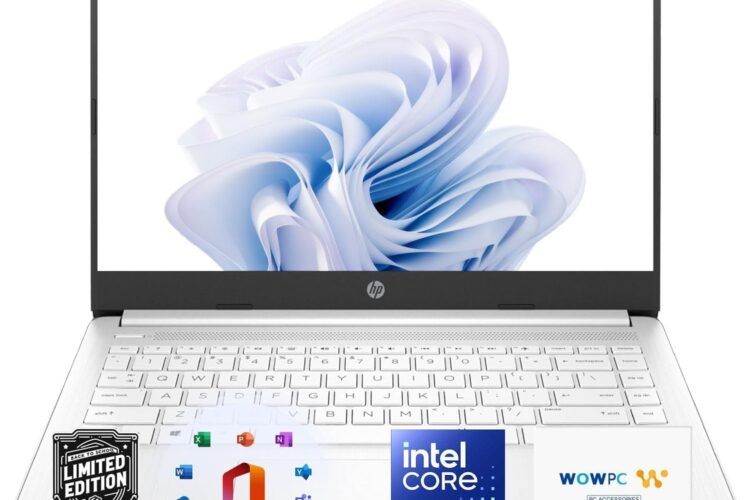
There’s a quiet majority of laptop buyers who don’t need cutting-edge performance or a machine that doubles as a professional workstation. What they need is something dependable — a laptop that boots quickly, handles daily tasks without drama, travels light, and doesn’t require a computer science degree to set up and use. The HP Everyday Laptop 2026 Edition appears to be designed with exactly that kind of user in mind.
This article takes a thorough, honest look at what this laptop offers, who it’s likely to serve well, and where its limitations might show. If you’re weighing whether this machine fits your needs, the goal here is to give you enough real information to make a confident decision — without the noise of marketing language getting in the way.
What Is the HP Everyday Laptop 2026 Edition?
HP has long been one of the most recognizable names in consumer computing, and their “Everyday” line has consistently been aimed at the mainstream market — people who want reliability and practicality over premium specs. The 2026 edition continues that tradition, pairing 8GB of RAM with a 256GB SSD, bundling Microsoft Office 365, and running Windows 11 out of the box.
Perhaps the most notable aspect of this particular configuration is what’s included before you even open a browser: a fully licensed productivity suite. For many buyers, that single inclusion meaningfully changes the value calculation. Office 365 — which covers Word, Excel, PowerPoint, Outlook, OneNote, and more — is software that most people either already pay for or wish they had. Getting it bundled removes one of the first purchases most new laptop owners face.
Add to that a claimed battery life of up to 12 hours and fast charge capability, and you have a machine that’s genuinely designed around how people actually use laptops day to day: unplugged, on the go, and usually doing several things at once without taxing workloads.
Key Features
8GB RAM
Eight gigabytes of RAM is the current standard for mainstream laptops, and it’s a reasonable baseline for everyday computing. Web browsing, word processing, video calls, spreadsheet work, streaming, and light multitasking all fall comfortably within what 8GB can handle.
Where things can feel tighter is when you’re running multiple demanding applications simultaneously — a video editing timeline, a browser with 20+ tabs, and a background file sync all running at once, for instance. For that kind of heavy multitasking, more RAM would be beneficial. But for the tasks this laptop is designed for, 8GB is a practical and functional amount.
256GB SSD Storage
The shift from traditional hard drives to solid-state drives has done more for the everyday laptop experience than almost any other hardware change in recent memory. SSDs boot faster, open applications more quickly, and are far more resistant to damage from being moved around than spinning hard drives.
256GB is a modest but workable storage capacity. For users who primarily work in documents, spreadsheets, presentations, and emails — and who store photos and videos in the cloud or on external drives — 256GB is sufficient. Where it starts to feel constrained is if you download a lot of large files, keep extensive photo libraries locally, or install many large applications. Managing storage mindfully becomes important at this capacity, but it’s a manageable trade-off for most everyday users.
Microsoft Office 365 Included
This deserves its own section, because it’s genuinely significant. Office 365 (now marketed as Microsoft 365) isn’t just a set of applications — it includes cloud storage through OneDrive, regular software updates, and in many configurations, multi-device licensing. Having it pre-bundled means you open the laptop and immediately have access to professional-grade tools for writing, data management, and presentations.
For students, this covers almost everything a school or university might require. For professionals working remotely or from home, it provides the full suite of tools their colleagues and clients are likely using. For families, it means everyone in the household has access to the tools they need without a separate subscription.
It’s worth confirming the specific terms of the included Office 365 license — whether it’s a one-year subscription or a longer arrangement, and how many devices it covers — as these details can vary between configurations.
Windows 11
Windows 11 is Microsoft’s current flagship operating system, and it represents a meaningful evolution from Windows 10 in both design and functionality. The interface is cleaner, with a centered taskbar and a more modern visual language. Features like Snap Layouts make managing multiple open windows easier — genuinely useful when you’re working across documents, a browser, and communication tools at the same time.
Windows 11 also includes deeper integration with Microsoft Teams for communication, improved virtual desktop support, and better touch and pen support for those who use touchscreen devices. On the security front, it brings hardware-based protections and a more rigorous update cadence.
For users coming from Windows 10, the adjustment period is short. For those coming from older Windows versions or switching from a different platform, the learning curve is gentle — Windows 11 is intuitive enough for most people to navigate comfortably within hours.
Thin and Portable Design
HP has put visible effort into making this laptop easy to carry. A thin, lightweight form factor matters more than many buyers initially realize — until they’ve spent a week carrying a heavy laptop in a bag and felt the difference. Whether you’re commuting, moving between rooms at home, taking it to class, or packing it for a trip, a lighter machine genuinely improves the daily experience.
Thin design also tends to reflect modern manufacturing choices — newer, more efficient processors that generate less heat, better battery technology, and advances in component miniaturization. It’s not just about looks; a thinner chassis often signals a thoughtfully engineered machine.
Fast Charge and Up to 12 Hours Battery Life
Battery life claims should always be taken with some degree of practical skepticism — manufacturers test under controlled conditions that don’t always mirror real-world use. That said, a 12-hour claim gives reasonable confidence that you can expect a full workday of mixed use without needing to plug in.
Fast charge is a feature that’s easy to underestimate until you rely on it. Being able to top up significantly in 30 to 45 minutes — rather than waiting two or more hours for a full charge — adds flexibility to unpredictable schedules. It’s the kind of practical feature that makes a real difference in daily life rather than just sounding impressive in a spec sheet.
How the HP Everyday Laptop Can Be Used
Home Productivity and Remote Work
For remote workers, this laptop covers the essential bases well. Video calls through Teams or Zoom, document collaboration in Office 365, email management, and web-based tools all run comfortably. The bundled Office suite is particularly relevant here — most remote work involves Word documents and Excel spreadsheets, and having those tools ready to go from day one removes friction.
The thin design and decent battery also mean it’s easy to move from a home office desk to a kitchen table to a couch without the experience feeling tethered to a power outlet.
Student Use
Students are arguably the most natural audience for this kind of laptop. The demands of most academic work — writing papers, researching online, preparing presentations, attending online lectures, submitting assignments — are squarely within what this machine handles well.
Office 365 is particularly valuable in educational contexts. Most universities and schools require or prefer Office-formatted files, and having native access to Word, PowerPoint, and Excel eliminates the compatibility friction that sometimes comes with alternative productivity suites.
The portability factor matters on campus, where carrying a laptop between lectures, the library, and student spaces is routine. And 12 hours of battery life is enough to get through a full day of classes without worrying about outlets.
Casual Home Use
For households where a laptop primarily means browsing the web, watching streaming content, managing finances, staying connected on social media, or keeping up with email, this configuration is more than capable. The performance ceiling these tasks require is well below what even a modest modern laptop can provide.
This also makes it a sensible option as a shared family computer or as a dedicated machine for a family member who needs something reliable but doesn’t require high-end performance.
Small Business Administration
Freelancers, consultants, and small business owners who spend their working hours in documents, spreadsheets, presentations, and communication tools will find this machine covers their needs comfortably. The Office 365 inclusion is especially relevant for professional use — Outlook alone is a significant productivity tool for business communication and calendar management.
Light Creative Work
Writing, blogging, basic photo organization, and casual design work in web-based tools like Canva are all achievable on this platform. It’s not positioned for professional video editing or heavy graphic design, but for content creators whose workflow is primarily writing and basic visual work, it provides a functional foundation.
Who This Laptop May Be Suitable For
Being clear about who a product fits helps more than enthusiastic generalizations. Here’s an honest look at who this machine is likely to serve well:
Students at any level — From high school through postgraduate study, the combination of portability, battery life, Office 365, and Windows 11 maps cleanly onto academic needs.
Remote workers in office-based roles — If your work primarily lives in documents, spreadsheets, email, and video calls, this laptop handles that workload reliably.
Users upgrading from an aging machine — Someone coming from a five- or six-year-old laptop running Windows 10 or earlier will notice a meaningful improvement in speed, responsiveness, and software currency.
Budget-conscious buyers who need Office — The bundled Office 365 license shifts the effective value calculation. If you’d otherwise be paying for Office separately, that changes the math.
People who travel or commute regularly — Thin design and long battery life are particularly valuable for users who are regularly on the move.
Older or less technically experienced users — Windows 11 is accessible, the setup is straightforward, and having essential software pre-installed reduces the complexity of getting started.
Those who are less likely to benefit from this machine:
Power users who regularly run computationally intensive applications — video editors, 3D designers, software engineers with heavy compilation workloads — will bump against the limits of this configuration. Similarly, dedicated gamers will find that mainstream laptops in this category aren’t designed for gaming performance.
Important Things to Consider
Storage Management
256GB fills up faster than most people expect. If you work with lots of photos, download video content for offline viewing, or install many large applications, you’ll need a storage strategy. Cloud storage through OneDrive (included with Office 365) can help offset local storage limits significantly. External drives are another practical option. Going in with eyes open about this makes it manageable rather than frustrating.
RAM Expandability
Whether the RAM in this laptop is upgradeable depends on the specific model configuration. Many modern thin laptops solder memory to the motherboard, making post-purchase upgrades impossible. If you anticipate your computing needs growing over the coming years, it’s worth checking this detail before purchasing. If expansion is possible, it provides a useful upgrade path down the line.
Processor Specifics
HP’s Everyday lineup covers a range of processor options, and the specific chip in your configuration matters for real-world performance. The listed specs don’t specify the exact processor, and this is worth investigating before purchasing — it has a direct bearing on how well the machine handles sustained multitasking and whether performance holds up over several years.
Display Quality
Everyday laptops at this price point typically use IPS LCD panels, which offer good viewing angles and color accuracy for general use. If you do color-sensitive creative work or spend significant time doing detailed visual tasks, it’s worth checking the display specifications more carefully.
Long-Term Software Support
Windows 11 will receive security updates and support from Microsoft for the foreseeable future, which is reassuring. Checking the specific end-of-support date for the Windows version on your device is a good habit when planning how long you intend to use the machine.
Office 365 License Terms
As mentioned earlier, confirming exactly what’s included with the bundled Office license — duration, device limits, and whether it includes the full desktop suite or a web-only version — is important. It affects the real value of the bundle.
General Category Comparisons
Rather than evaluating specific competing products, it’s useful to understand how this category of laptop fits within the broader landscape.
Everyday Laptops vs. Chromebooks
Chromebooks run ChromeOS and are highly dependent on web-based applications and Google’s ecosystem. They tend to be less expensive, simpler to maintain, and have excellent battery life. For users who live primarily in Google Docs and web apps, they work well. The HP Everyday Laptop, by contrast, runs full Windows 11 and includes native Office 365 applications, making it more versatile for users who need desktop software or work in Microsoft-centric environments.
Everyday Laptops vs. Premium Ultrabooks
Premium ultrabooks — think higher-end business laptops from HP’s own Spectre line, or similar tiers from other manufacturers — offer faster processors, higher-resolution displays, premium build materials, and often better keyboards. They also cost significantly more. For users whose needs align with what the Everyday tier provides, the additional investment in a premium machine may not deliver proportional practical value.
Everyday Laptops vs. Tablets with Keyboards
iPad and Android tablet setups with keyboard accessories can approximate a laptop experience for many tasks. They’re often more portable and have excellent battery life. However, full Windows compatibility, the ability to run desktop applications natively, and the more ergonomic laptop form factor give traditional laptops an edge for sustained productivity work. Tablets tend to shine for content consumption; laptops tend to serve content creation better.
Everyday Laptops vs. Desktop Computers
Desktops offer more power per dollar and are easier to upgrade over time. If portability isn’t a factor and the machine will live permanently on a desk, a desktop configuration often provides better long-term value. The HP Everyday Laptop makes sense when you need a self-contained, portable machine — if you don’t, a desktop may serve you better for the same budget.
Frequently Asked Questions
Does Office 365 require an internet connection to use? The desktop applications in Office 365 — Word, Excel, PowerPoint, and others — work offline once installed. An internet connection is needed for cloud sync features and for certain online-only tools within the suite, but the core applications function without connectivity.
Is 256GB enough storage for a student? For most students, yes — particularly if you store large files (photos, videos, downloaded content) in the cloud or on external drives. Academic documents, applications, and coursework generally don’t consume as much local storage as media files do. Using OneDrive (included with Office 365) helps considerably.
Can this laptop run Zoom or Microsoft Teams comfortably? Yes. Video calling applications like Zoom, Teams, and Google Meet are well within the performance envelope of this machine. Video calls are not computationally intensive, and 8GB of RAM handles them without difficulty.
How realistic is the 12-hour battery claim? Battery life claims are typically measured under manufacturer conditions — usually light tasks, reduced screen brightness, and Wi-Fi connected but not actively streaming. In real-world mixed use, expect something in the range of 7 to 10 hours. That’s still strong for an all-day laptop. Fast charge partially compensates for the difference between tested and actual battery life.
Is Windows 11 a significant change from Windows 10? For most users, the transition is smooth. The core functionality is familiar, and the interface changes — while noticeable — are intuitive. Microsoft has made the Start menu and overall navigation accessible for users at all experience levels. Most Windows 10 software runs without modification on Windows 11.
Can the storage be expanded? Some laptops in this category include a microSD card slot or an accessible M.2 SSD slot for expansion. Whether this model supports storage upgrades depends on the specific hardware configuration. Checking the technical specifications before purchase is recommended.
Is this laptop suitable for light photo editing? For casual photo management, basic adjustments in apps like Photos or Lightroom at standard resolutions, yes. For professional-level photo editing involving large RAW files or complex layered work, the configuration may feel limiting under sustained workloads.
What warranty does HP typically include? HP generally offers a one-year limited warranty on its consumer laptops, covering manufacturing defects. Extended warranty options are often available. Confirming warranty terms at the time of purchase is always advisable.
Conclusion
The HP Everyday Laptop 2026 Edition occupies a clear and well-defined space in the laptop market: reliable everyday performance, a practical set of features, and a genuinely useful bundle that includes Microsoft Office 365 from the moment you open the box. It’s not a machine that will impress with benchmark scores or cinematic display quality, and it’s not trying to be. What it aims to do is cover the computing needs of a wide range of everyday users — students, remote workers, families, small business owners — without unnecessary complexity or cost.
The 8GB RAM and 256GB SSD configuration handles the tasks most people actually do on a laptop with ease. Windows 11 provides a modern, secure foundation. The thin design and strong battery life make it genuinely portable in a practical sense. And fast charging adds the kind of real-world flexibility that improves daily life in small but meaningful ways.
The main considerations to weigh before committing are storage management, the specifics of the included Office license, and whether the processor in your particular configuration suits your performance expectations. For users who go in with a clear-eyed understanding of what this machine is designed to do — and who find that it matches their actual needs — it represents a sensible, well-rounded choice.