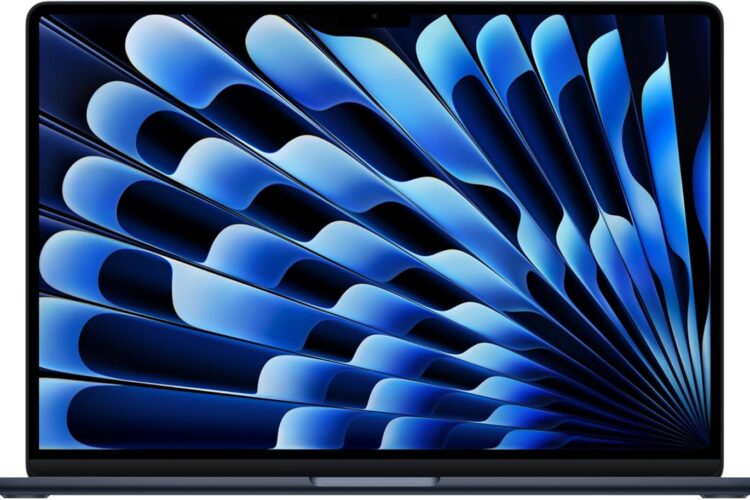
The laptop market has never been more competitive, and yet Apple continues to carve out a very specific space for itself with each new generation of MacBook Air. The 2026 edition of the 15-inch MacBook Air arrives with the M5 chip at its core, a larger Liquid Retina display, and a design that stays true to what made its predecessors popular — thin, silent, and surprisingly capable for its size.
This article takes a detailed look at everything this machine brings to the table. Whether you are a student weighing your options, a creative professional thinking about upgrading, or simply someone curious about what the M5 chip actually means in practice, this guide is written to give you a clear and honest picture.
A Quick Overview of What This Machine Is
Before getting into the details, it helps to understand what the MacBook Air is designed to be. Unlike the MacBook Pro lineup, the Air is built around a fanless design. That means no active cooling system, no vents, and no fan noise — ever. Apple achieves this by designing chips that are efficient enough to handle demanding tasks without generating excessive heat.
The 2026 model continues this philosophy while stepping up performance with the M5 chip, expanding the display to 15.3 inches, and including modern connectivity features like Wi-Fi 7. It comes in the Midnight color finish, which has become one of the more popular options in Apple’s palette for its understated, professional look.
Key Features of the 2026 MacBook Air 15-inch M5
The M5 Chip: Built for AI and Everyday Performance
The M5 chip is the centerpiece of this machine, and Apple describes it as being built specifically with AI in mind. This is not just marketing language — the chip includes a dedicated Neural Engine that handles machine learning tasks locally, without relying on cloud processing.
What does that mean in practical terms? It means tasks like real-time transcription, image processing, language-based tools, and AI-powered features in creative apps run directly on the device. This has two major benefits: speed and privacy. Because the processing happens on the chip rather than being sent to a server, results are faster and your data stays on your machine.
Beyond AI-specific workloads, the M5 chip handles general computing tasks with significant efficiency. Video editing, running multiple applications simultaneously, working with large spreadsheets, and even casual gaming are all within its capability range. The chip also plays a major role in battery life, since its efficiency means the system draws less power to accomplish the same tasks compared to older architectures.
15.3-inch Liquid Retina Display
The screen on this MacBook Air is one of its strongest selling points. At 15.3 inches, it offers considerably more workspace than a standard 13-inch laptop, which makes a meaningful difference when working on detailed documents, editing photos, or keeping multiple windows open side by side.
The Liquid Retina display technology delivers sharp, accurate colors and high brightness levels. For anyone who works with visual content — whether that is graphic design, video production, photography, or even just detailed presentations — screen quality matters a great deal, and this panel is designed to meet a high standard.
The display also supports True Tone technology, which automatically adjusts the color temperature based on the ambient lighting in your environment. This reduces eye strain during long working sessions and makes the screen look more natural in different lighting conditions.
16GB Unified Memory
Memory in Apple Silicon machines works differently from traditional RAM. Unified Memory means the CPU, GPU, and Neural Engine all draw from the same pool of memory, which reduces latency and improves efficiency. 16GB in this configuration is Apple’s standard starting point for the M5 generation.
For most users — students, writers, designers working on moderately complex projects, developers, and general professionals — 16GB is comfortable for everyday multitasking. Running a browser with many tabs open, a communication app, a document editor, and a media player simultaneously is handled without significant slowdown.
It is worth noting, however, that users who work with extremely large video files, run virtual machines, or work in heavily memory-intensive development environments may find themselves wanting more. Apple does offer higher memory configurations on other models, so this is something to consider depending on your specific workload.
512GB SSD Storage
The 512GB solid-state drive offers a practical amount of local storage for most users. SSDs in MacBook Air models are consistently fast, which contributes to quick app launches, fast file transfers, and snappy overall system responsiveness.
For users who store large media libraries locally, 512GB can fill up over time. However, most modern workflows involve a mix of local and cloud storage, and for those users, 512GB strikes a reasonable balance. External drives and cloud services like iCloud are also straightforward to integrate with macOS if additional storage is needed down the line.
12MP Center Stage Camera
The built-in webcam has received a notable upgrade in recent Apple laptop generations, and the 12MP Center Stage camera continues that trend. Center Stage is a feature that uses machine learning to automatically keep you centered in the frame during video calls, even if you move around.
This is particularly useful for anyone who takes video calls frequently — remote workers, educators, consultants, or students attending online classes. The camera tracks your movement subtly, without the jarring effect of manual camera adjustment. The result is a more polished and professional appearance on calls without any extra setup.
Touch ID
Touch ID on the MacBook Air serves as both a fingerprint sensor for unlocking the device and an authentication method for purchases through Apple Pay and for app-level security prompts. It is built into the power button, which keeps the design clean and minimal.
For users who value quick access and a streamlined login experience, Touch ID is a daily convenience that becomes difficult to live without once you are used to it.
Wi-Fi 7
Wi-Fi 7 is the latest generation of wireless networking, offering significantly faster speeds and lower latency compared to Wi-Fi 6 and 6E. While many home and office routers have not yet upgraded to Wi-Fi 7, having the capability built into the laptop means the machine is ready for the next several years of networking infrastructure.
For users who already have Wi-Fi 7 routers, the benefit is immediate — faster file transfers, smoother video streaming at higher resolutions, and more reliable connections in congested network environments. For everyone else, it is a future-proofing feature that adds long-term value to the purchase.
Midnight Finish
The Midnight color is a deep, dark blue-black finish that looks professional and refined in most environments. It is one of Apple’s more popular color options for the MacBook Air line. One thing worth knowing is that, like many dark anodized finishes, it can show fingerprints more visibly than lighter colors. A soft cloth wipe takes care of this easily, but it is a minor practical consideration for those who prefer a lower-maintenance finish.
How the MacBook Air 15-inch M5 Can Be Used
For Students
The 15.3-inch display gives students more screen real estate for research, note-taking, and working across multiple windows. The battery life that Apple Silicon machines are known for means carrying a charger to every class is less of a concern. The fanless design keeps things quiet in library environments, and the lightweight build makes it manageable in a backpack.
The M5 chip also handles AI-based study tools more efficiently, which is increasingly relevant as AI writing assistants, research tools, and tutoring platforms become part of the academic workflow.
For Remote and Hybrid Workers
For professionals working from home or splitting time between the office and home, the MacBook Air 15-inch offers a compelling combination of portability and screen size. It is large enough to be a primary work machine, yet light enough to move between locations without feeling like a burden.
Video conferencing quality is strong thanks to the 12MP Center Stage camera, and the integration with macOS productivity tools — Calendar, Mail, Notes, Reminders — alongside third-party apps like Microsoft Office, Slack, and Zoom is seamless.
For Creative Professionals at an Intermediate Level
Photographers editing in Lightroom, designers working in Figma or Adobe Illustrator, and video editors working on projects that do not involve heavy 4K or 8K multi-stream workflows will find the M5 chip more than adequate. The Liquid Retina display provides accurate color representation that makes visual work more reliable.
It is worth pointing out that for professional-level video editing with extremely complex timelines, colorists working with RAW footage, or 3D rendering artists, the MacBook Pro lineup with its active cooling and higher memory ceilings may be a better fit. The Air handles a wide range of creative tasks, but it has limits at the very high end.
For Developers and Programmers
Software development is a strong use case for the MacBook Air. Running code editors, local servers, version control tools, and browser testing simultaneously is well within the machine’s comfort zone. The M5 chip’s performance on compilation tasks and its support for running Xcode for iOS and macOS development is a practical advantage for developers in the Apple ecosystem.
For General Everyday Use
For users who primarily browse the web, stream content, communicate via email and messaging apps, manage personal finances, and handle light document work, the MacBook Air 15-inch is more than sufficient. The experience is smooth, the display makes media consumption enjoyable, and the battery life means it can get through a full day of moderate use on a single charge in most scenarios.
Who This Laptop May Be Most Suitable For
This machine tends to align well with the following profiles:
Users who prioritize battery life and portability over raw performance headroom. Those who want a silent machine with no fan noise whatsoever. Students or professionals who would benefit from a larger screen without moving to a heavier laptop. People already in the Apple ecosystem who want seamless integration with iPhone, iPad, and Apple Watch. Anyone looking for a future-ready device with Wi-Fi 7 and AI-focused processing built in.
Important Things to Consider Before Deciding
No Active Cooling The fanless design is a feature for many users, but it does mean the chip will throttle performance under sustained, extremely heavy workloads to manage heat. For tasks that push the processor hard for extended periods, this is worth keeping in mind.
Memory Cannot Be Upgraded Like all Apple Silicon MacBook models, the memory is soldered to the motherboard. Whatever configuration you choose at purchase is what you will have for the life of the machine. Choosing the right memory option upfront is important.
Port Selection The MacBook Air 15-inch includes two Thunderbolt ports and a MagSafe charging port, along with a 3.5mm headphone jack. Users who rely on USB-A devices, HDMI output, or SD card readers will need a hub or adapters, which is a practical consideration for certain workflows.
macOS Ecosystem The MacBook Air runs macOS, not Windows. For users who depend on Windows-only software, this is a real consideration. Most major professional and productivity applications are available on macOS, but niche or enterprise-specific tools may not be.
How the 15-inch Air Compares in General Category Terms
When thinking about where the MacBook Air 15-inch fits within the broader laptop landscape, a few general categories are worth considering:
Air vs. Pro within Apple’s lineup: The MacBook Pro models offer active cooling, higher memory ceilings, ProMotion displays with higher refresh rates, and more ports. The Air is lighter, thinner, and more affordable while sharing the same chip family. For most users, the Air is the right choice. For sustained professional workloads, the Pro makes more sense.
15-inch vs. 13-inch Air: The 15-inch model offers more screen space and slightly larger speakers but is a bit heavier and larger physically. The 13-inch is more compact and easier to carry for users who prioritize portability above all else.
MacBook Air vs. Windows ultrabooks in the same category: Windows competitors in this segment often have more port variety and offer touchscreen options, which macOS does not support on laptops. However, Apple Silicon’s efficiency means the MacBook Air typically leads in battery life and performance-per-watt comparisons within this category.
Frequently Asked Questions
Is 16GB of memory enough for everyday use? For most users — including students, professionals, and creatives working on moderate projects — 16GB is comfortable. Power users working with large video files, running virtual machines, or doing intensive development work may want to consider a higher memory option on another model.
Does the M5 chip really make a difference for AI tasks? Yes. The dedicated Neural Engine in the M5 chip handles on-device machine learning tasks more efficiently than previous generations. This translates to faster performance in AI-powered features within apps and better handling of real-time processing tasks like transcription and image enhancement.
How is the battery life? Apple Silicon MacBook Air models are generally known for strong battery life. The M5 chip’s efficiency contributes to this, though actual battery life varies significantly based on workload, screen brightness, and the apps being used. Light to moderate use throughout a day is typically manageable on a single charge.
Is Wi-Fi 7 worth it if my router does not support it? Not immediately, but it is a future-proofing feature. As Wi-Fi 7 routers become more common over the next few years, having a compatible device means you will benefit from the upgrade without needing a new laptop.
Can this machine run Windows? Apple no longer supports Boot Camp on Apple Silicon Macs. Running Windows natively is not an option. However, virtualization software like Parallels Desktop allows Windows to run within macOS, which works for many use cases, though it adds cost and some complexity.
Is the Midnight color hard to maintain? The Midnight finish is prone to showing fingerprints more than lighter color options. Regular wiping with a soft microfiber cloth keeps it looking clean. It is a minor inconvenience rather than a serious concern for most users.
What ports does this laptop include? The MacBook Air 15-inch includes two Thunderbolt 4 ports, a MagSafe 3 charging port, and a 3.5mm headphone jack. Users needing USB-A, HDMI, or SD card slots will want to invest in a quality USB-C hub.
Conclusion
The 2026 Apple MacBook Air 15-inch with M5 chip is a thoughtfully designed machine that balances portability with performance in a way that suits a wide range of users. The larger display, AI-focused chip, upgraded camera, and Wi-Fi 7 support make it a meaningful step forward from previous generations while keeping the characteristics that the Air line is known for — silence, thinness, and efficient battery usage.
It is not the right tool for every professional. Heavy video production workflows, intensive 3D work, and tasks that demand sustained peak performance over long periods may push it to its limits. But for students, remote workers, creative professionals at an intermediate level, developers, and general users who want a premium laptop experience with a large, beautiful screen, it covers a lot of ground very well.
As with any laptop purchase, the right choice depends on your specific needs, workflow, and budget. Taking the time to understand what you actually need from a machine — rather than what sounds impressive on paper — is always the best starting point.