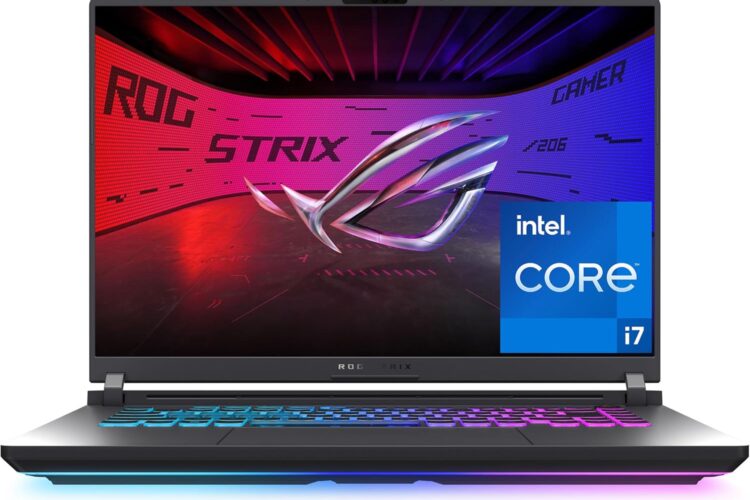
There is something about a new generation of gaming laptops that always sparks curiosity, especially when the specs sheet reads as confidently as this one does. The ASUS ROG Strix G16 has been around long enough as a product line that most people in the gaming space recognize the name, but the 2025 version brings enough under the hood to warrant a fresh look. This article walks through what the laptop actually offers, how it fits into real life, and what you should genuinely think about before committing to it.
No fluff, no hype. Just a clear picture.
A Quick Introduction to the ROG Strix Line
ASUS launched the Republic of Gamers brand years ago as a dedicated gaming hardware division, and the Strix series sits in the middle of that ecosystem — not the entry-level stuff, not the absolute flagship Zephyrus tier, but solidly in the performance-focused category where most serious gamers tend to land.
The 2025 G16 carries that tradition forward with a combination of Intel’s latest HX-series processor, NVIDIA’s new RTX 50-series mobile GPU, a fast 16-inch display, and connectivity features that reflect where the industry is heading rather than where it has been. It is a machine built for people who want real performance in a portable package and are not interested in making too many compromises to get it.
The Display Deserves More Attention Than It Usually Gets
Most people jump straight to the GPU when they see a gaming laptop spec sheet, which is understandable. But the display is what you actually look at every single time you use the machine, and this one does something a little different that is worth understanding.
The ROG Strix G16 uses a 16-inch FHD+ panel with a 16:10 aspect ratio. Most laptops, gaming or otherwise, ship with 16:9 panels. The difference in height between the two ratios is subtle on paper but genuinely noticeable in use. You get more vertical space — more of a webpage visible without scrolling, more of a document on screen at once, a slightly taller field of view in certain games. It is one of those things that feels small until you go back to a 16:9 screen and notice what you were missing.
The refresh rate sits at 165Hz with a 3ms response time. The 165Hz number means the screen can update up to 165 times per second. In fast games — shooters, fighting games, anything where quick motion and reaction time matter — that smoothness is tangible. The 3ms response time means pixels switch states quickly, which keeps motion looking clean rather than smeared or blurred during fast movement.
For gaming, this display is well matched to the hardware driving it. For everyday use, the 16:10 format makes the laptop feel more comfortable to work on than a lot of gaming machines that feel almost cinematic in proportion.
What Is Actually Inside
The GPU: NVIDIA GeForce RTX 5060 Laptop
The RTX 5060 belongs to NVIDIA’s 50-series architecture, which is the current generation at time of writing. Without getting too deep into the technical weeds, what this means practically is that the GPU handles modern games well, supports real-time ray tracing at meaningful performance levels, and brings NVIDIA’s latest DLSS technology along with it.
DLSS — particularly the Frame Generation feature in DLSS 4 — is worth understanding because it changes the performance equation in an interesting way. The GPU uses AI processing to generate additional frames between rendered ones, allowing games to run at higher effective frame rates than the hardware would produce on its own. In a laptop where thermal limits cap how much power the GPU can draw, this kind of intelligent performance assistance matters more than it does on a desktop where you can just throw more power at the problem.
Ray tracing, which simulates how light behaves realistically in game environments, is supported in hardware. Whether you run it depends on the specific game and how much visual fidelity versus frame rate you prioritize, but having the option available without a massive performance penalty is a meaningful step forward from older mobile GPU generations.
The Processor: Intel Core i7-14650HX
The HX designation on Intel mobile processors is worth paying attention to. HX chips are derived from Intel’s desktop platform rather than being purpose-built mobile designs, which gives them more cores and higher sustained performance than standard laptop processors. The 14650HX runs a hybrid core architecture that mixes performance-oriented cores with efficiency-focused ones, letting the system allocate resources intelligently depending on what is being asked of it.
In gaming, the processor handles the parts of the game that are not GPU work — physics, enemy behavior, game logic, feeding data to the graphics card. A capable CPU in this role prevents the kind of bottlenecking where the GPU is sitting idle waiting for the processor to keep up. In creative applications, the multi-core performance becomes directly relevant for things like rendering, compiling, and encoding.
Memory: 16GB DDR5
DDR5 is the current memory standard in modern high-performance systems. Compared to the DDR4 that was common in laptops just a few years ago, DDR5 offers higher bandwidth, which benefits both the CPU and integrated graphics paths. 16GB covers the realistic needs of gaming in 2025 comfortably, handling the memory demands of current titles alongside browser tabs, communication apps, and background processes without strain.
For certain heavier workloads — large video projects, running multiple virtual machines, working with complex 3D scenes — more memory is always welcome, and whether the specific configuration supports upgrades is worth confirming if that matters to you.
Storage: 1TB Gen 4 SSD
Storage speed affects more of your daily experience than most people realize until they use a fast drive. Gen 4 NVMe SSDs offer significantly higher read and write speeds compared to the Gen 3 drives that were standard until recently. Game load times, system startup, application launches, and file transfers all benefit from the faster interface. 1TB gives reasonable room for a gaming library and system files, though anyone with a large collection of installed games will likely want to think about external storage or be selective about what stays installed.
Wi-Fi 7
This is a forward-looking inclusion that reflects where home networking is heading. Wi-Fi 7 — technically 802.11be — operates across multiple frequency bands simultaneously through a feature called Multi-Link Operation. The practical result is lower latency and more consistent speeds compared to Wi-Fi 6E, particularly in environments with many wireless devices competing for bandwidth.
For gaming specifically, the latency improvements are more meaningful than raw speed numbers. A connection that stays consistently low-latency rather than spiking unpredictably makes online gaming noticeably more stable. As Wi-Fi 7 routers become more common in homes, having a laptop that supports the standard ensures you can take full advantage.
Windows 11 Home
The laptop ships with Windows 11 Home, which is Microsoft’s current mainstream operating system. It includes DirectX 12 Ultimate support, which is required to access the full feature set of modern GPUs including ray tracing, variable rate shading, and mesh shader support.
What People Actually Use This Kind of Laptop For
Gaming, obviously — but it helps to be specific. The RTX 5060 and 165Hz display make this machine well-suited for mid-to-high settings gameplay across current AAA titles, competitive shooters, and open-world games. It is not a laptop where you will find yourself staring at a settings menu wondering if you need to drop everything to medium just to keep things playable.
Video editing and content creation is a realistic secondary use case for this hardware. The GPU’s ability to accelerate encoding and color processing in applications like DaVinci Resolve and Premiere Pro, combined with the fast SSD and capable processor, makes video work feel fluid rather than frustrating. Creators who also happen to be gamers — or gamers who produce content around their hobby — will find this machine handles both sides of that life reasonably well.
Game streaming and broadcasting benefits directly from NVIDIA’s hardware encoding capabilities. Streaming gameplay compresses video in real time, which is a significant workload. Offloading that to the GPU’s dedicated NVENC encoder rather than the CPU keeps in-game performance much more stable while streaming, which is something that cheaper hardware often struggles to manage.
Development and programming works well on machines with fast storage and capable processors. Large project builds, containerized environments, and IDE-heavy workflows all respond positively to the kind of hardware here, though developers with specific memory or software requirements should evaluate accordingly.
Who This Laptop Makes Sense For
There is no universal answer here, and honest writing about laptops means being upfront about that. This machine fits well for a few specific types of people.
If you are a gamer who wants current-generation performance without going to a 17 or 18-inch workstation-class machine, the 16-inch G16 hits a practical size that works both at a desk and on the go without feeling unwieldy.
If you are a student or working professional who wants one machine for both work and play, the combination of a productivity-friendly 16:10 display, capable processor, and serious GPU makes this a viable all-in-one rather than a compromise in either direction.
If you are coming from a laptop that is three or more years old — particularly anything with a GTX 1060, 1070, or early RTX 20-series GPU — the generational leap in performance and features will feel significant.
If you create content around gaming, stream, or do creative work alongside playing games, the hardware profile covers those workflows without requiring a separate dedicated machine.
Honest Things to Consider
Battery life during gaming will be limited. This is simply the nature of high-performance laptop hardware. Running the GPU and CPU at full power draws significantly from the battery. For lighter tasks — reading, browsing, watching video — the laptop will last longer, but heavy gaming is best done plugged in. This is true across virtually every laptop in this performance category.
It will get warm and audible under load. ASUS’s ROG Intelligent Cooling system manages thermals reasonably well, but sustained gaming will engage the fans. If you are in a quiet environment and sensitive to fan noise, this is worth knowing in advance. Gaming laptops at this performance level generate heat and move air to manage it — that is simply the physical reality.
The power brick is large. High-wattage laptops need substantial power adapters. This one is no different, and if you travel frequently, the adapter adds meaningful bulk and weight to your bag. It is a small thing but worth factoring into expectations.
16GB may feel limiting over time for some users. For gaming today, it is adequate. But if you plan to keep this laptop for four or five years and your workloads are memory-intensive, knowing the upgrade path matters. Check the specific configuration for upgrade options if this is a concern.
The size and weight reflect what is inside. A 16-inch high-performance gaming laptop is not light. It is portable in the sense that you can carry it to different places, but it is not designed to compete with ultrabooks for everyday carry comfort.
Where It Sits in the Broader Market
Gaming laptops in 2025 broadly divide into a few camps. On one end, thin-and-light gaming laptops trade thermal headroom for portability, often running their GPUs at reduced power to fit into slim chassis. At the other extreme, desktop-replacement machines with 17 or 18-inch screens maximize performance but become genuinely difficult to carry.
The ROG Strix G16 sits in the space between those extremes in a way that most users find practical. It is not throttling itself to stay thin, but it is also not so large that it stops being a laptop you would realistically take anywhere. The 16:10 display format gives it a slightly more workday-friendly character than pure gaming machines, which adds versatility without taking anything away from the gaming side.
The inclusion of Wi-Fi 7, DDR5, Gen 4 storage, and RTX 50-series GPU in the same package reflects a genuine attempt to build something that stays relevant longer rather than shipping with last-generation components at every tier except the GPU.
Frequently Asked Questions
Is 16GB of DDR5 RAM enough for modern gaming?
For the overwhelming majority of current games, yes. Most titles in 2025 are designed with 16GB as the comfortable target. Memory-intensive work outside of gaming — large video projects, virtual machines, certain development environments — may push against that ceiling, but for gaming as a primary use case it covers the realistic need.
What does 165Hz actually feel like compared to 60Hz?
The difference is immediately apparent in fast-moving content. Motion feels significantly smoother, fast camera movements look cleaner, and in competitive gaming the responsiveness feels more direct. Most people who switch from a 60Hz display to something in the 144-165Hz range find it difficult to go back.
How is Wi-Fi 7 different from Wi-Fi 6E in practice?
The key difference for gaming is Multi-Link Operation, which allows the laptop to use multiple wireless bands simultaneously for a single connection. This reduces latency spikes and keeps the connection more consistent under real-world conditions. The raw throughput improvements are also substantial, though for gaming the latency story is what matters most day to day.
Can the RTX 5060 handle ray tracing in current games?
Yes, with the caveat that performance with ray tracing enabled depends on the specific game and settings. DLSS Frame Generation helps significantly here by generating additional frames using AI processing, which lets you run ray tracing effects at quality settings that would otherwise be too demanding for stable frame rates.
Does this laptop work well for video editing?
The hardware profile — fast GPU, capable CPU, DDR5 memory, Gen 4 SSD — maps well onto the demands of video editing software. GPU acceleration in applications like DaVinci Resolve and Premiere Pro benefits directly from the RTX 5060’s capabilities, and the fast storage makes working with large project files less of a waiting game.
Is the 16:10 aspect ratio actually useful or just a marketing point?
It is genuinely useful. The extra vertical space is noticeable in everyday use — more content visible on websites, documents, and in applications that benefit from height. In games that support it, the taller field of view can also be a practical advantage. It is a feature that tends to be appreciated more the longer you use it.
Wrapping Up
The ASUS ROG Strix G16 (2025) is a well-assembled machine that puts current-generation hardware into a form factor that works for more than just gaming. The RTX 5060 and 165Hz display are a natural pairing, the 16:10 panel adds everyday usability that pure gaming machines sometimes skip, and the inclusion of Wi-Fi 7 and Gen 4 storage means it is built with the near future in mind rather than just checking boxes at launch.
It is not a perfect machine for every person — battery life, weight, and fan noise during gaming are real considerations that apply to this entire category of laptop. But for users who want genuine gaming performance in a 16-inch portable package without giving up too much elsewhere, it makes a strong case for itself.
Take the time to think through your actual needs — the games you play, how you use a laptop day to day, how much portability matters, and what else you might use the machine for.